
Download 30characters – AI‑Powered Search Ad Creator
Overview
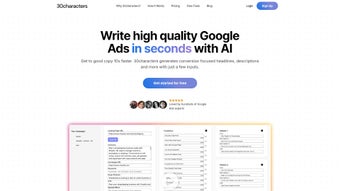
30characters is an AI‑driven web application built to streamline the creation of high‑performing search ads. Marketers, agencies, and e‑commerce teams often wrestle with writer’s block, endless revisions, and the need to generate dozens of ad variations quickly. This subscription‑based tool solves those pain points by turning simple inputs—landing‑page URLs, target keywords, and call‑to‑action statements—into polished headlines and descriptions that meet Google’s character limits.
Whether you run Responsive Search Ads (RSAs) or the newer Performance MAX (PMAX) campaigns, 30characters can generate copy that aligns with each format’s requirements. The platform also supports bulk import into Google Ads Editor, multilingual output for global markets, and a clean, intuitive interface that minimizes the learning curve. In short, 30characters offers a secure, fast, and cost‑effective way to produce ad copy at scale while preserving creative control.
Features & How to Get Started
Core Feature List
- AI‑generated headlines and descriptions with a single click.
- Support for RSA and PMAX ad formats.
- Bulk upload to Google Ads Editor for fast campaign rollout.
- Multilingual generation (English, Spanish, German, French, and more).
- Customizable tone and brand voice settings.
- Real‑time preview of character limits and policy compliance.
- Version history and easy export to CSV or Google Sheets.
- Secure cloud storage with SSL encryption.
Installation & Usage Instructions
Getting started with 30characters is intentionally frictionless. Because it is a web‑based SaaS solution, there is no traditional “installation” on your desktop. Follow these steps to launch the app and begin creating ads:
- Sign up for a free trial. Visit the official website, click the “Start Free Trial” button, and provide an email address. A verification link will be sent to confirm your account.
- Select a subscription plan. After verification, choose between the monthly or annual plan. All plans include unlimited ad generation, but the annual plan offers a 20 % discount.
- Set up your workspace. Once logged in, you’ll be greeted by a dashboard where you can create a new project. Name the project (e.g., “Spring Sale 2025”) and select the campaign type (RSA or PMAX).
- Enter seed data. Input the landing‑page URL, primary keywords, and a call‑to‑action phrase. If you manage multiple ad groups, you can upload a CSV file containing rows for each ad group.
- Generate copy. Click the “Generate” button. The AI engine processes your inputs and returns a list of headline‑description pairs, each adhering to Google’s character limits. Use the built‑in sliders to adjust tone (formal, casual, persuasive) or to prioritize certain keywords.
- Fine‑tune and export. Review each suggestion, edit directly in the UI if needed, and then click “Export.” Choose either a CSV file for Google Ads Editor or a Google Sheet link for collaborative review.
- Launch. Import the CSV into Google Ads Editor, map the fields, and push the changes to your Google Ads account. The ads are now live and ready for performance tracking.
Throughout the process, 30characters provides inline help tips, a searchable knowledge base, and live chat support. The platform also auto‑saves your work every few seconds, ensuring that you never lose a draft.
Compatibility, Pros & Cons
Supported Operating Systems
Because 30characters runs entirely in the browser, it is compatible with any modern operating system that supports Chrome, Firefox, Edge, or Safari. This includes Windows 10/11, macOS Monterey and later, Linux distributions, as well as mobile browsers on Android 12+ and iOS 15+. The responsive design adapts to tablets and smartphones, allowing you to generate ad copy on the go.
Pros
- Speed: Generates dozens of ad variations in seconds, dramatically reducing copywriting time.
- Accuracy: AI model is trained on Google’s ad policies, minimizing disapprovals.
- Scalability: Handles large accounts with hundreds of campaigns and ad groups without performance degradation.
- Multilingual: Supports over 12 languages, making it ideal for global marketers.
- User‑friendly: Minimal learning curve thanks to a clean UI and guided workflow.
- Secure: All data is encrypted in transit and at rest; GDPR‑compliant.
Cons
- Subscription cost: While cheaper than hiring a dedicated copywriter, the monthly fee may be a barrier for very small businesses.
- Internet dependency: As a cloud‑only service, you need a stable connection to generate copy.
- Limited visual design: The tool focuses on text; it does not create display ad creatives.
Frequently Asked Questions
-
Can I use 30characters for Google Shopping ads?
No. 30characters currently focuses on text‑based search ads (RSA and PMAX). Shopping ads require product feed data, which is outside the scope of this tool.
-
Is there a free version available?
A 7‑day free trial is offered to all new users, allowing you to test the full feature set before committing to a paid plan.
-
How does the AI ensure compliance with Google’s ad policies?
The underlying language model is fine‑tuned on a corpus of approved Google ads and incorporates real‑time policy checks that flag disallowed terms before they are displayed.
-
Can I import existing ad copy for improvement?
Yes. You can upload a CSV of current headlines and descriptions, and the AI will suggest optimized alternatives while preserving your original messaging.
-
What support channels are available?
Customers receive 24/7 live chat, email support, and access to a comprehensive knowledge base. Premium plans also include a dedicated account manager.
Conclusion & Call to Action
In an environment where speed, relevance, and compliance dictate ad success, 30characters delivers a powerful, AI‑enhanced solution that cuts the time spent on copywriting by more than half. Its ability to handle multiple languages, bulk operations, and direct integration with Google Ads Editor makes it a compelling choice for agencies managing large portfolios as well as in‑house teams looking to scale quickly. While the subscription cost may be a consideration for very small businesses, the ROI generated through higher click‑through rates and fewer disapprovals typically outweighs the expense. If you’re ready to eliminate writer’s block, accelerate campaign launches, and maintain consistent brand voice across markets, download 30characters today and start your free trial. Experience the future of ad creation—secure, fast, and AI‑driven.



.png)



